Configuration of the OPC HDA Server
Starting the OPC HDA Server
For the first start the WinCC OA OPC HDA server must be registered on the server. After registration the OPC HDA server starts automatically if a client tries to connect. The server starts even if no OPC HDA server has been added to the WinCC OA console of the project. The state of the OPC HDA server can be monitored by the PMON if an OPC HDA server manager is added to the project console. To prevent influences form the automatic start and stop behavior of the PMON it is recommended to change the starting mode to "manual".
If you want the OPC HDA server to be started automatically please note that per default, WCCOAopchdasrv.exe always tries to start with "-num 1". Therefore, the server cannot start if number 1 is occupied by another manager. To prevent this you can edit the Windows Registry and define a specific manager number for the HDA server. Proceed as follows:
Run "regedit" (Windows key + R) to open the Registry Editor. Search the registry list for "WINCC_OA.OPCHDA" via CTRL + F and go to the "LocalServer32" folder. Right click "(Default)" and select "Modify..." to edit the defined path. Add -num <number> to the path to start the server with the proper manager number. E.g. < wincc_oa_path>/bin/WCCOAopchdasrv.exe -num 3
The OPC HDA server always connects to the last started project (-currentProj). In most cases the right connection is established. If the OPC HDA server is connected to the wrong project please restart the project you want to connect to.
OPC HDA Server Registration
The registration should be done automatically when the server is installed. If this is not the case, the server can be registered manually.
OPC HDA Server Registration Syntax
WCCOAopchdasrv /regserver <ProgId prefix> <Server Description>| Parameter | Description |
|---|---|
| ProgId prefix | The prefix that should be used to create the ProgId. The
internally created ProgId uses following format:<ProgId
prefix>.OPCHDA.1 By default the ProgId prefix
"WINCC_OA" is used and the resulting ProgId (Program Identification
from the registry) for the server will be
"WINCC_OA.OPCHDA.1" (For a second OPC HDA
server the ProgID "WINCC_OA.OPCHDA.2" is
used). |
| Server Description | Description text for the server. If the description contains spaces the text must be marked using double quotes. Default: "WinCC OA OPC HDA Server" |
 Example
WCCOAopchdasrv /regserver MYOPCHDASRV "My Product OPC HDA Server" "My company"Start a Second Server
You can also start a second server in the console. The second server has to be registered and started with the following command:
WCCOAopchdasrv /runServer2 /RegServerUnregister a Server
For unregistering a server the following command can be used:
WCCOAopchdasrv /unregserverStopping the OPC HDA Server
The OPC HDA server automatically stops after the last client closes the connection to the server.
WinCC OA Configuration of the OPC HDA Server
The OPC HDA server requires the usage of the datapoint group OPCHDARead. To receive values from the WinCC OA server, the necessary datapoint elements must be added to the OPC HDA datapoint group.
No further configuration is required due to the OPC HDA server starting automatically if a client tries to connect.
It is to consider that the timestamps of the WinCC OA OPC HDA Server always use UTC time. This also applies to the historical values of the datapoint element type "time".
Change the DP Group OPCHDARead
To change the OPCHDARead datapoint group the datapoint group configuration panel must be opened. The configuration panel is located under "System Management > Database > DP Groups".
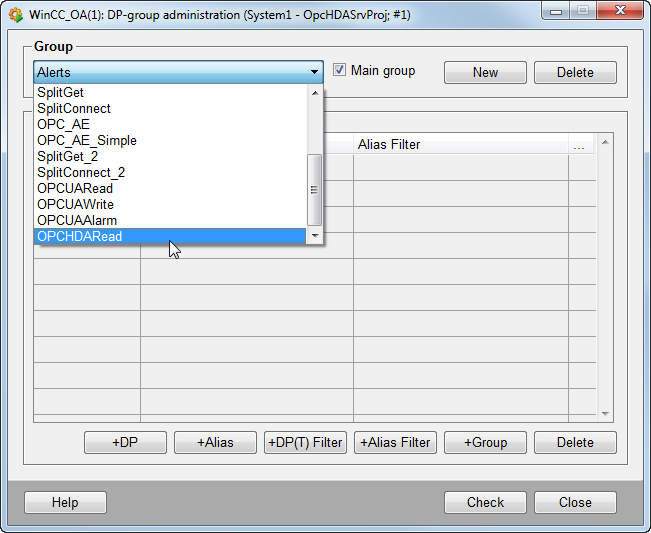
The panel allows e.g. to define a list of datapoints or datapoint filters to define the information contained in the datapoint group. All elements added to the OPCHDARead datapoint group will be provided to the OPC HDA clients that connect to the WinCC OPC HDA server. Further information regarding the datapoint group panel can be found in the Datapoint Group chapter!
Changes to the datapoint group are only applied to the OPC HDA server if a restart of the server is performed!